How to Get More Google Reviews via WhatsApp (Without Breaking Google’s Rules)
Reviews are one of the biggest local ranking factors. A simple WhatsApp flow to ask every customer for a Google review, the wording, the timing, and what Google does not allow.
Google says local results are based mainly on relevance, distance and prominence, and that review count and ratings are part of prominence. For a clinic, salon, coaching institute or agency in Mumbai, steady genuine reviews are one of the few ranking factors you control. WhatsApp is the easiest place to ask, because that is where your customers already talk to you.
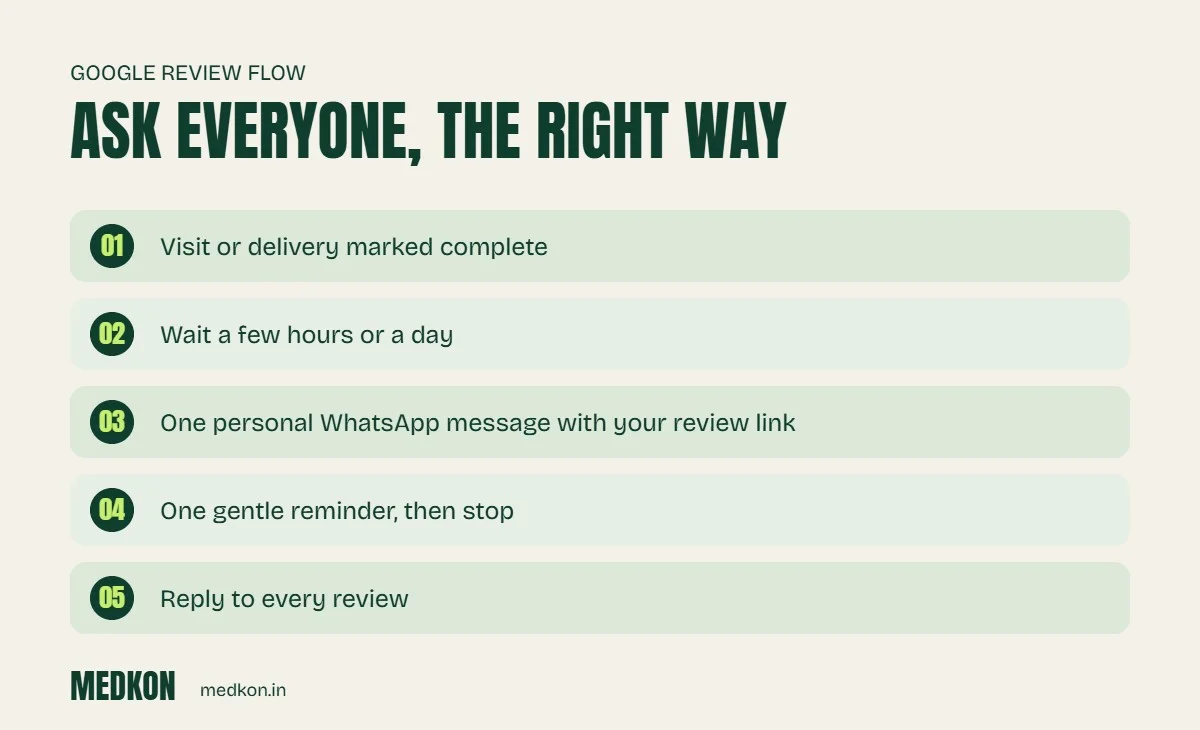
The review flow
- Trigger: the visit, delivery or project is complete (marked in your CRM, clinic software or order system).
- Wait: a few hours after a visit, or a day or two after delivery, so the experience is fresh but the customer has had time to use what they bought.
- Ask: one short, personal message with your direct Google review link.
- One reminder: a gentle nudge a few days later if there is no review. Then stop.
- Reply: respond to every review, good or bad, from your Google Business Profile.
Wording that works
Hi [name], thank you for visiting [business] today. If you have a minute, an honest review on Google helps other people find us: [link]. Thank you! – [your name]
What Google does not allow
- Incentives: no discounts, gifts or cashback in exchange for reviews.
- Review gating: do not ask only happy customers, or first ask "Were you satisfied?" and send the link only to those who say yes.
- Fake or employee reviews: never write reviews yourself or ask staff, friends or agencies to post them.
Violations can get reviews removed and your profile restricted. Genuine reviews from every customer, including the occasional critical one, look more trustworthy anyway.
Getting your review link
In your Google Business Profile, use "Ask for reviews" to copy the short link, and use the same link in every message.
We add review requests to every clinic and WhatsApp automation we build.
Frequently asked questions
Do Google reviews help local ranking?
Yes. Google says prominence, which includes review count and ratings, is one of the main factors in local results.
Can I offer a discount for a Google review?
No. Google does not allow incentives in exchange for reviews.
Can I send the review link only to happy customers?
No. Selectively asking only satisfied customers is review gating, which Google does not allow. Ask everyone.
How often should I remind customers to leave a review?
Once is enough. Send one request and at most one gentle reminder.